October 8, 2015
The Answer Pad is an interesting educational platform for teachers. It combines two powerful functionalities: it is both a student response system and a grading solution for your quizzes. It is an ideal tool for engaging students in a flipped or blended learning classroom.
As a teacher, you can use Interactive to directly involve students in their learning by providing them with an outlet through which they can show what they know. Students-generated feedback is a great source of data to inform and guide your teaching and also makes you aware of areas that need more work .
As a grading tool, you can use The Answer Pad to transition from paper to digital assessment.’ Set up an electronic answer sheet for your paper test on-line, using any of the eight different question types. Students can also use a scratch pad to show their work. With a built-in, robust reporting system for item analysis, the Answer Pad offers reports by skill, by class, and by student. Teachers can view the scratch pad showing the student work. In addition, school and district implementations are available for aggregate reporting.’
The Answer Pad is available for the web, Android and iPad.
Hiển thị các bài đăng có nhãn flipped classroom. Hiển thị tất cả bài đăng
Thứ Tư, 7 tháng 10, 2015
Thứ Bảy, 15 tháng 8, 2015
Office Mix- An Excellent Free Tool for Creating Interactive Flipped Lessons
August 14, 2015
After we have seen how to easily create educational posters using PowerPoint, today we are sharing with you another free handy tool from Microsoft called Office Mix. This is basically an add-in for PowerPoint that allows you to create and share interactive online lessons. You can record yourself talking through your lessons, add drawings and images to your slides, and embed interactive features such as quizzes and polls. Upon sharing your interactive slides with students, you will also get to see who watched it and get assessment reports on how they did on quizzes. You will even know which slide they spent more time staring at.
Here are some useful video tutorials from Microsoft in Education to help you learn more about how to use Office Mix in your class:
1- Create Virtual Science Experiments in Office Mix
2- Insert Quizzes to Check Knowledge in Office Mix Lessons
3- Flip your Classroom by Creating Office Mix Lessons
Follow us on : Twitter, Facebook , Google plus, Pinterest .
After we have seen how to easily create educational posters using PowerPoint, today we are sharing with you another free handy tool from Microsoft called Office Mix. This is basically an add-in for PowerPoint that allows you to create and share interactive online lessons. You can record yourself talking through your lessons, add drawings and images to your slides, and embed interactive features such as quizzes and polls. Upon sharing your interactive slides with students, you will also get to see who watched it and get assessment reports on how they did on quizzes. You will even know which slide they spent more time staring at.
Here are some useful video tutorials from Microsoft in Education to help you learn more about how to use Office Mix in your class:
1- Create Virtual Science Experiments in Office Mix
2- Insert Quizzes to Check Knowledge in Office Mix Lessons
3- Flip your Classroom by Creating Office Mix Lessons
Follow us on : Twitter, Facebook , Google plus, Pinterest .
Thứ Năm, 16 tháng 7, 2015
Flip Your Classroom with These Teacher-tested Tools
July 16 , 2015
Looking for more resources to help you flip your classroom? Here are a set of teacher-tested tools that can aid in video capture and editing, digital storytelling, and organizing all of your online materials.
Moodle
Looking for more resources to help you flip your classroom? Here are a set of teacher-tested tools that can aid in video capture and editing, digital storytelling, and organizing all of your online materials.
Moodle
A popular open source learning management system that now offers cloud hosting, for free!
Cut out any section of a YouTube video you'd like to share with students and colleagues.
Take a picture, then record a yourself speaking and drawing on the picture. Good for how-to videos.
Create stories using easy drag & drop controls, voice recordings, stickers, emoticons, and more.
Want more? Check out these shelves of tools.
Screencasting and Video Lesson Creation Tools
Want more? Check out these shelves of tools.
Screencasting and Video Lesson Creation Tools
This is curated by assistive technology specialist Tandra Ericson.
This one is curated by assistant professor and teacher-librarian Dr. Joyce Valenza.
By Mike Lee, Co-founder of edshelf
Thứ Năm, 23 tháng 4, 2015
Two Key Advantages of A Flipped Classroom
April 23, 2015
Flipped classroom is a learning and teaching trend that is gaining so much in popularity due mainly to the raise of web technologies and the proliferation of web 2.0 tools that facilitate communication and collaboration on a larger scale. And while some teachers have already started experimenting with the new concept, others are still skeptical and wary about whether to make the move or not. For those of you who are still not sure about the potential of flipped learning and what benefits it has over traditional instruction, this page packed full of resources on flipped learning is a definitely a good place to start with.
We are also sharing with you this wonderful video from Jon and Aaron showcasing some of the key advantages of integrating a flipped instructional paradigm in your teaching. We have summarized these advantages in the points below. For more details about these points we highly recommend reading this interesting post by Jon Bergmann titled” Flipped Learning Toolkit: 5 Steps for Formative Assessment”.
The two key advantages of a flipped classroom are:
1- More time for formative assessment
In a flipped classroom where instruction is done outside of the classroom through videos and tutorials, teachers get to have more in-class time to work directly with students and assess them formatively so they know where they are at with their learning and help them achieve more. More formative assessment with students means more important feedback and insights on how the overall instructional process is performing. Such feedback is also a goldmine of data to inform teachers lesson planning and enhance their instructional strategies. Unlike summative assessment which takes place only once in a term or at the end of the year, formative assessment is on going and accompanies students learning growth and therefore provides more relevant information on the teaching/learning process.
2- Individualized and differentiated instruction
Individualized instruction is a means and not an aim of flipped classroom. It is a means towards enabling students to make the best of their learning experiences.Also, individualized instruction is a correlative with formative assessment for it is through the latter that we get to design the former. In a sense, formative assessment guides teachers efforts in providing more focused and targeted individualized help to those in need.And because the time that teachers would normally spend in class directly instructing their learners is done elsewhere and through other means (i.e. videos), teachers have more time to spend on one-on-one differentiated instruction.
The short video below by Jon and Aaron elucidates these two points more clearly.
Flipped classroom is a learning and teaching trend that is gaining so much in popularity due mainly to the raise of web technologies and the proliferation of web 2.0 tools that facilitate communication and collaboration on a larger scale. And while some teachers have already started experimenting with the new concept, others are still skeptical and wary about whether to make the move or not. For those of you who are still not sure about the potential of flipped learning and what benefits it has over traditional instruction, this page packed full of resources on flipped learning is a definitely a good place to start with.
![]() |
| Image source: User-generated Education |
We are also sharing with you this wonderful video from Jon and Aaron showcasing some of the key advantages of integrating a flipped instructional paradigm in your teaching. We have summarized these advantages in the points below. For more details about these points we highly recommend reading this interesting post by Jon Bergmann titled” Flipped Learning Toolkit: 5 Steps for Formative Assessment”.
The two key advantages of a flipped classroom are:
1- More time for formative assessment
In a flipped classroom where instruction is done outside of the classroom through videos and tutorials, teachers get to have more in-class time to work directly with students and assess them formatively so they know where they are at with their learning and help them achieve more. More formative assessment with students means more important feedback and insights on how the overall instructional process is performing. Such feedback is also a goldmine of data to inform teachers lesson planning and enhance their instructional strategies. Unlike summative assessment which takes place only once in a term or at the end of the year, formative assessment is on going and accompanies students learning growth and therefore provides more relevant information on the teaching/learning process.
2- Individualized and differentiated instruction
Individualized instruction is a means and not an aim of flipped classroom. It is a means towards enabling students to make the best of their learning experiences.Also, individualized instruction is a correlative with formative assessment for it is through the latter that we get to design the former. In a sense, formative assessment guides teachers efforts in providing more focused and targeted individualized help to those in need.And because the time that teachers would normally spend in class directly instructing their learners is done elsewhere and through other means (i.e. videos), teachers have more time to spend on one-on-one differentiated instruction.
The short video below by Jon and Aaron elucidates these two points more clearly.
Thứ Sáu, 3 tháng 4, 2015
A New Visual on Flipped Learning
April 4, 2015
Follow us on : Twitter, Facebook , Google plus, Pinterest .
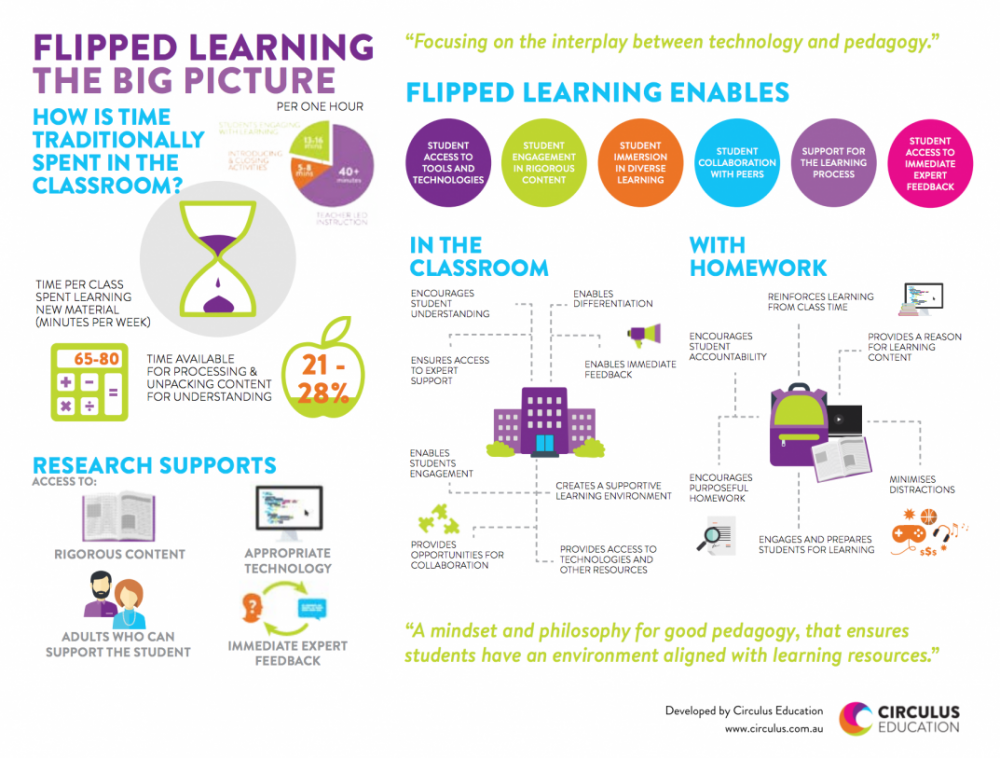
Here is another excellent graphic on flipped learning that we want to bring to your attention. As you see below, “Flipped Learning: The Big Picture” provides a visual illustration of the concept of flipped learning in terms of what it has to offer to students learning both in class and at home. According to this graphic, flipped learning positively impact the learning that takes place in the classroom in the sense that it:Encourages student understanding, enables differentiation, ensures access to expert support, enables student engagement, creates a supportive learning environment, and provides opportunities for collaboration. Read on to learn more about how flipped learning supports students learning.
Via:Circus Education
Courtesy of eLearning Infographics
Follow us on : Twitter, Facebook , Google plus, Pinterest .
Thứ Tư, 1 tháng 4, 2015
The Flipped Learning Process Visually Explained
April 2, 2015

via Daily Genius
Courtesy of eLearning Infographics
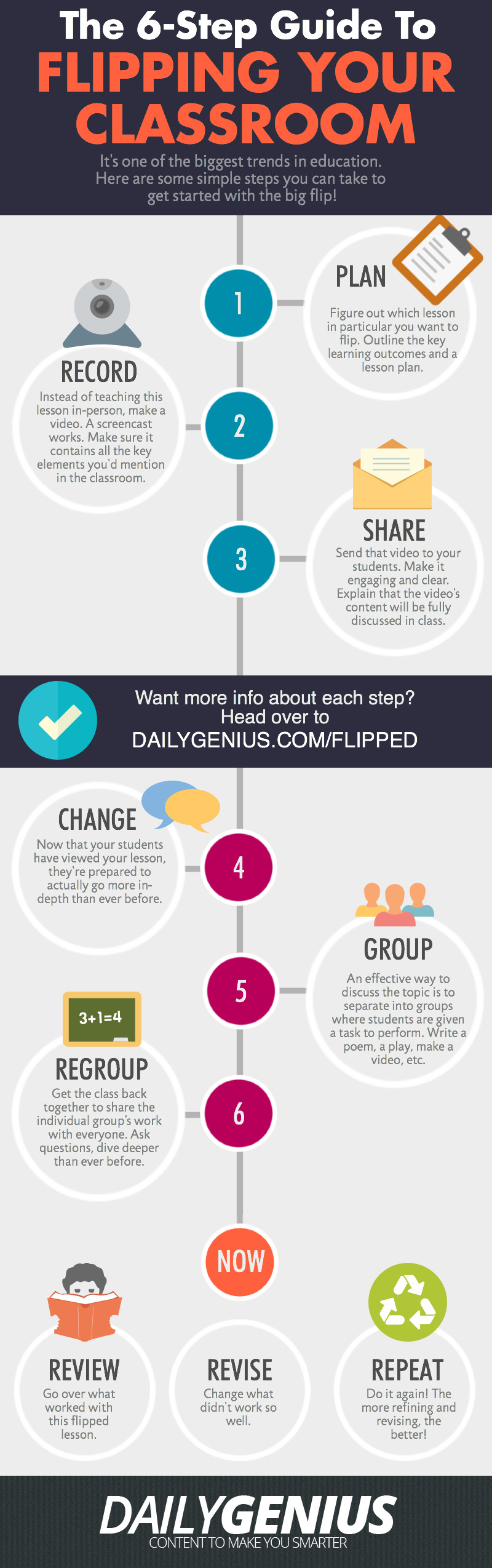
After yesterday’s post on “Flipped Learning Resources” one of our readers emailed us this beautiful visual outlining the six main steps involved in the creation of a flipped classroom. These steps include: planning, recording, sharing, changing, grouping, and regrouping. Read the graphic for more details on each of these steps.
As a refresher for those who are not yet familiar with the concept of a flipped classroom. Flipped learning or Flipped classroom or is a methodology, an approach to learning in which technology is employed to reverse the traditional role of classroom time. If in the past, classroom time is spent at lecturing to students , now in a flipped model, this time is utilized to encourage individualized learning and provide one-on-one help to students, and also to improve student-teacher interaction. While the instructional or teachable content is still available in class, however this content is mainly designed in such a way to be accessed outside class which is a great way for struggling students to learn at their own pace.
via Daily Genius
Courtesy of eLearning Infographics
Thứ Ba, 31 tháng 3, 2015
Two Great Resources for Flipped Classrooms
April 1, 2015
Flipped classroom or flipped learning is a methodology, an approach to learning in which technology is employed to reverse the traditional role of classroom time. If in the past, classroom time is spent at lecturing to students , now in a flipped model, this time is utilized to encourage individualized learning and provide one-on-one help to students, and also to improve student-teacher interaction. While the instructional or teachable content is still available in class, however this content is mainly designed in such a way to be accessed outside class which is a great way for struggling students to learn at their own pace.
Here are two great resources packed full of tools and app to help you flip your classroom:
This is a list curated by technology coordinator Cassie Holewinski.
This one is curated by education researcher Meghan Arthur.
By Mike co-founder of edshelf
Thứ Hai, 2 tháng 2, 2015
Teacher-tested Tools for Flipped Classroom
February 3, 2015
Whether you are just dipping your toe in flipped classroom instruction or have been carrying it out already, the right tools can make a big difference. Here are a set of teacher-tested tools that may help.
Bibblio
Whether you are just dipping your toe in flipped classroom instruction or have been carrying it out already, the right tools can make a big difference. Here are a set of teacher-tested tools that may help.
Bibblio
A vast resource of educational content of all formats, organized visually.
eduCanon
eduCanon
Turn videos on YouTube, Vimeo, or TeacherTube into interactive quizzes.
Or add images, text, discussions, and quizzes to videos for interactive lessons.
A Community of Practice is for sharing best practices in flipped classroom instruction.
Want more? Check out these collections of tools.
Flipped Classroom Tools
Want more? Check out these collections of tools.
Flipped Classroom Tools
This is curated by pre-service teacher Alicia Leonard.
This one is curated by professional development coordinator Marcia Kish.
By Mike co-founder of edshelf
Thứ Năm, 29 tháng 1, 2015
A Great Overview of The Flipped Classroom
January 30, 2015
Looking for a short insightful overview of the Flipped Classroom concept? Dr Jackie Gerstein has this wonderful video clip where she explains the essence of flipped classroom. The video is very short, a little over 2 minutes but it really does the job. For those of you looking for more resources and guides on how to integrate this flipped learning paradigm into their instruction, this section has tons of materials to browse through.
I am also sharing with you this chart I created last month comparing some major tools to use for a flipped classroom. You can check the Google Doc version of this chart from this link.
Looking for a short insightful overview of the Flipped Classroom concept? Dr Jackie Gerstein has this wonderful video clip where she explains the essence of flipped classroom. The video is very short, a little over 2 minutes but it really does the job. For those of you looking for more resources and guides on how to integrate this flipped learning paradigm into their instruction, this section has tons of materials to browse through.
I am also sharing with you this chart I created last month comparing some major tools to use for a flipped classroom. You can check the Google Doc version of this chart from this link.
Thứ Ba, 27 tháng 1, 2015
This Is How to Create Flipped Videos by Adding Interactive Elements and Annotations to YouTube Clips
January 27, 2015
In an earlier post covering the best YouTube resources for teachers I argued that the educational potential of YouTube resides in it being both a free platform that provides a wide variety of educational videos to use in class and also in the powerful editing features it offers to video creators. In today’s post, I am sharing with you one of YuTube’s useful editing feature that allows you to add interactivity to your videos.
Using the interactivity feature, teachers will be able to add interactive elements to their videos to boost students engagement with the content of their videos. These interactive features can be annotations, links to other videos or external resources on the web, call-for action buttons and many more. James Sanders has this excellent video tutorial in which he explains in a step by step process how to upload your video to YouTube and add different interactive features to it. I invite you to watch and share it with your colleagues. Enjoy.
In an earlier post covering the best YouTube resources for teachers I argued that the educational potential of YouTube resides in it being both a free platform that provides a wide variety of educational videos to use in class and also in the powerful editing features it offers to video creators. In today’s post, I am sharing with you one of YuTube’s useful editing feature that allows you to add interactivity to your videos.
Using the interactivity feature, teachers will be able to add interactive elements to their videos to boost students engagement with the content of their videos. These interactive features can be annotations, links to other videos or external resources on the web, call-for action buttons and many more. James Sanders has this excellent video tutorial in which he explains in a step by step process how to upload your video to YouTube and add different interactive features to it. I invite you to watch and share it with your colleagues. Enjoy.
Đăng ký:
Bài đăng (Atom)