October 8, 2015
The Answer Pad is an interesting educational platform for teachers. It combines two powerful functionalities: it is both a student response system and a grading solution for your quizzes. It is an ideal tool for engaging students in a flipped or blended learning classroom.
As a teacher, you can use Interactive to directly involve students in their learning by providing them with an outlet through which they can show what they know. Students-generated feedback is a great source of data to inform and guide your teaching and also makes you aware of areas that need more work .
As a grading tool, you can use The Answer Pad to transition from paper to digital assessment.’ Set up an electronic answer sheet for your paper test on-line, using any of the eight different question types. Students can also use a scratch pad to show their work. With a built-in, robust reporting system for item analysis, the Answer Pad offers reports by skill, by class, and by student. Teachers can view the scratch pad showing the student work. In addition, school and district implementations are available for aggregate reporting.’
The Answer Pad is available for the web, Android and iPad.
Hiển thị các bài đăng có nhãn blended learning. Hiển thị tất cả bài đăng
Thứ Tư, 7 tháng 10, 2015
Thứ Năm, 24 tháng 9, 2015
8 Excellent Blended Learning Tools for Teachers
September 25, 2015
In its basic and simplest definition, blended learning is an instructional methodology, a teaching and learning approach that combines face-to-face classroom methods with computer mediated activities to deliver instruction. The strengths of this instructional approach is its combination of both face to face and online teaching methods into one integrated instructional approach. In today's post, we are sharing with you a set of some useful web tools you can use for blended learning:
1- Blubbr
Blubbr is a cool web tool that allows users to create quizzes around YouTube videos. These are basically interactive video quizzes ( called Trivs ) that you can create for your students and which they can answer while they watch the selected video clip. The quizzes are also feedback supported meaning students will get feedback as they answer each question.
2- Teachem
Teachem is a web service that allows teachers to create lessons around YouTube videos. They can also interact with videos through adding comments, questions and notes in the form of flashcards that can be pinned to videos.
3- Educanon
Educanon is another powerful tool that teachers can use to design lessons based on videos from both YouTube and Vimeo. And like Teachem, teachers can generate questions on the content of videos and share it together with videos in a single lesson.
4- VideoNotes
VideoNotes is a free web tool that allows students to take notes on a video they are watching. The notes are synchronized with the video being watched. The good thing about VideoNotes is that it is integrated into Google Drive which means that students will be able to save their notes directly to their Drive account and access, edit, and work on them anytime they want. All the notes are time-stamped.
TED Ed is a website that allows teachers to create lessons around YouTube videos. Teachers can select YouTube videos and use their URLs to add questions in different formats. The added value of this tool is that it has a section where teachers can track stats of how many has answered answers and hoa mnay students have seen the lesson. Check out this visual guide to learn more about how to created a video lessons using TED Ed.
Pontoon Edu allows you to animate difficult topics and engage your students using a wide variety of tools. You can easily drag and drop characters and props into your slides and assign it an animation, choose from different pre-designed templates and style libraries.Videos and animated presentations you create through PowToon Edu can be exported in various ways. You can share them on YouTube or Facebook, download them to your computer. You can also export them as MP4 file to embed in your classroom blog or website.
8- Blendspace
Blendspace is an excellent free tool to create flipped lessons for your class. You can create a class on Blendspace and invite up to 35 students to join it. The maximum number of active lessons you can have for free is 100. Besides sharing lessons with the class, you can also use it to collect web sources in a single place that you can share with students with just one link.
Follow us on : Twitter, Facebook , Google plus, Pinterest .
In its basic and simplest definition, blended learning is an instructional methodology, a teaching and learning approach that combines face-to-face classroom methods with computer mediated activities to deliver instruction. The strengths of this instructional approach is its combination of both face to face and online teaching methods into one integrated instructional approach. In today's post, we are sharing with you a set of some useful web tools you can use for blended learning:
1- Blubbr
Blubbr is a cool web tool that allows users to create quizzes around YouTube videos. These are basically interactive video quizzes ( called Trivs ) that you can create for your students and which they can answer while they watch the selected video clip. The quizzes are also feedback supported meaning students will get feedback as they answer each question.
2- Teachem
Teachem is a web service that allows teachers to create lessons around YouTube videos. They can also interact with videos through adding comments, questions and notes in the form of flashcards that can be pinned to videos.
3- Educanon
Educanon is another powerful tool that teachers can use to design lessons based on videos from both YouTube and Vimeo. And like Teachem, teachers can generate questions on the content of videos and share it together with videos in a single lesson.
4- VideoNotes
VideoNotes is a free web tool that allows students to take notes on a video they are watching. The notes are synchronized with the video being watched. The good thing about VideoNotes is that it is integrated into Google Drive which means that students will be able to save their notes directly to their Drive account and access, edit, and work on them anytime they want. All the notes are time-stamped.
6- Vialogues
Vialogue (Video + Dialogue ) is an online video with a group discussion feature. Vialogue allows users to interact with videos by adding time stamped comments to them. This can be a great tool for teachers to use with their students to get them engaged in video prompted discussions.To get started, upload a video, grab one from YouTube, or choose one from the growing collection on our site. Once you’ve created a vialogue, you can encourage thoughtful conversations by posing questions, adding polls, and replying to comments. You can even embed a vialogue into your website, LMS, or blog!
7- Pontoon Edu
Vialogue (Video + Dialogue ) is an online video with a group discussion feature. Vialogue allows users to interact with videos by adding time stamped comments to them. This can be a great tool for teachers to use with their students to get them engaged in video prompted discussions.To get started, upload a video, grab one from YouTube, or choose one from the growing collection on our site. Once you’ve created a vialogue, you can encourage thoughtful conversations by posing questions, adding polls, and replying to comments. You can even embed a vialogue into your website, LMS, or blog!
Blendspace is an excellent free tool to create flipped lessons for your class. You can create a class on Blendspace and invite up to 35 students to join it. The maximum number of active lessons you can have for free is 100. Besides sharing lessons with the class, you can also use it to collect web sources in a single place that you can share with students with just one link.
Follow us on : Twitter, Facebook , Google plus, Pinterest .
Thứ Bảy, 16 tháng 5, 2015
6 Models of Blended Learning Teachers Should Know About
May 16, 2015
In its basic and simplest definition, blended learning is an instructional methodology, a teaching and learning approach that combines face-to-face classroom methods with computer mediated activities to deliver instruction. The strengths of this instructional approach is its combination of both face to face and online teaching methods into one integrated instructional approach.
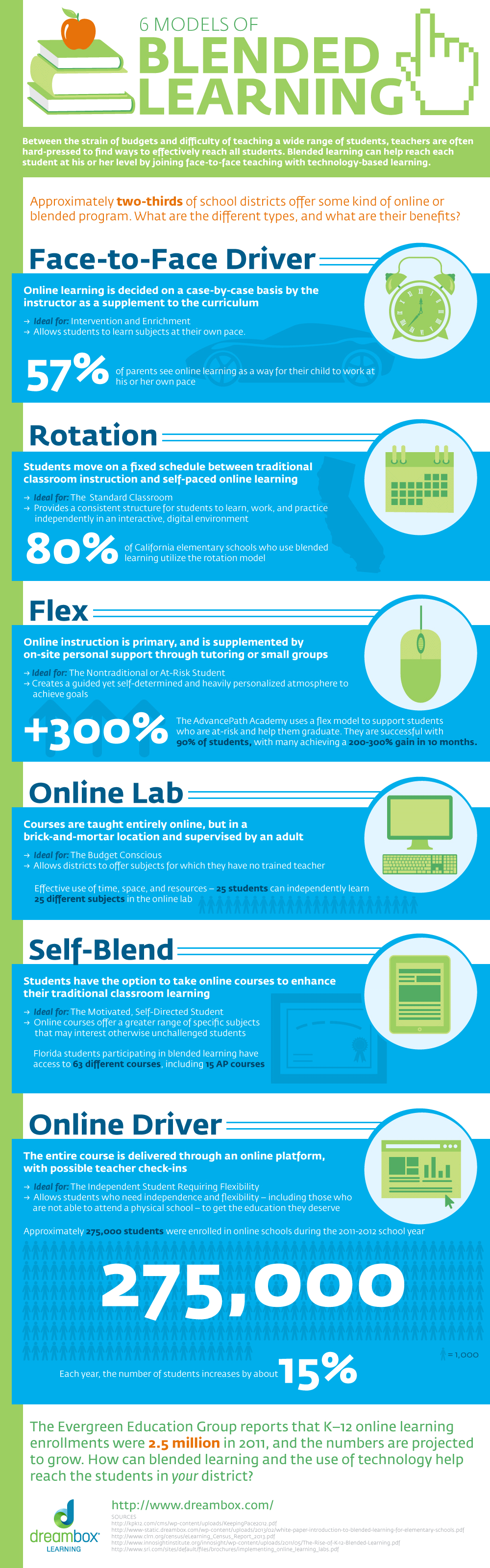
Blended Learning is a big concept, an umbrella term, that contains several other sub-methods. Below are the four models that are most used in schools today. According to Dreambox, the creator of this graphic, blended learning models are divided into 6 main categories:

Curtesy of eLearning Infographics
In its basic and simplest definition, blended learning is an instructional methodology, a teaching and learning approach that combines face-to-face classroom methods with computer mediated activities to deliver instruction. The strengths of this instructional approach is its combination of both face to face and online teaching methods into one integrated instructional approach.
Blended Learning is a big concept, an umbrella term, that contains several other sub-methods. Below are the four models that are most used in schools today. According to Dreambox, the creator of this graphic, blended learning models are divided into 6 main categories:
- Face-to-Face Driver Model
- Rotation Model
- Flex Model
- Online Lab Model
- Self-Blend Model
- Online Driver Model
Curtesy of eLearning Infographics
Thứ Ba, 17 tháng 3, 2015
Blended Learning Visually Explained for Teachers
March 17, 2015
Blended Learning is one of the major learning concepts that came about as a direct result of the impact of technology integration in education.In blended learning students and teachers get to experiment with a multimodal teaching method in which the digital and virtual learning is blended with the face-to-face one. However, one of the misconceptions circulating among those who are less enthusiastic about the use of this learning method in classrooms is that blended learning is nothing else but replacing teachers with technology. The infographic below debunks this myth and features the numerous benefits of blended learning. Have a look and share with us what you think of it. Enjoy
Via: More Than Blended Learning
Courtesy of eLearning Infographics
Follow us on : Twitter, Facebook , Google plus, Pinterest .
Blended Learning is one of the major learning concepts that came about as a direct result of the impact of technology integration in education.In blended learning students and teachers get to experiment with a multimodal teaching method in which the digital and virtual learning is blended with the face-to-face one. However, one of the misconceptions circulating among those who are less enthusiastic about the use of this learning method in classrooms is that blended learning is nothing else but replacing teachers with technology. The infographic below debunks this myth and features the numerous benefits of blended learning. Have a look and share with us what you think of it. Enjoy
Courtesy of eLearning Infographics
Follow us on : Twitter, Facebook , Google plus, Pinterest .
Đăng ký:
Bài đăng (Atom)