Thứ Sáu, 3 tháng 4, 2015

A New Visual on Flipped Learning

April 4, 2015
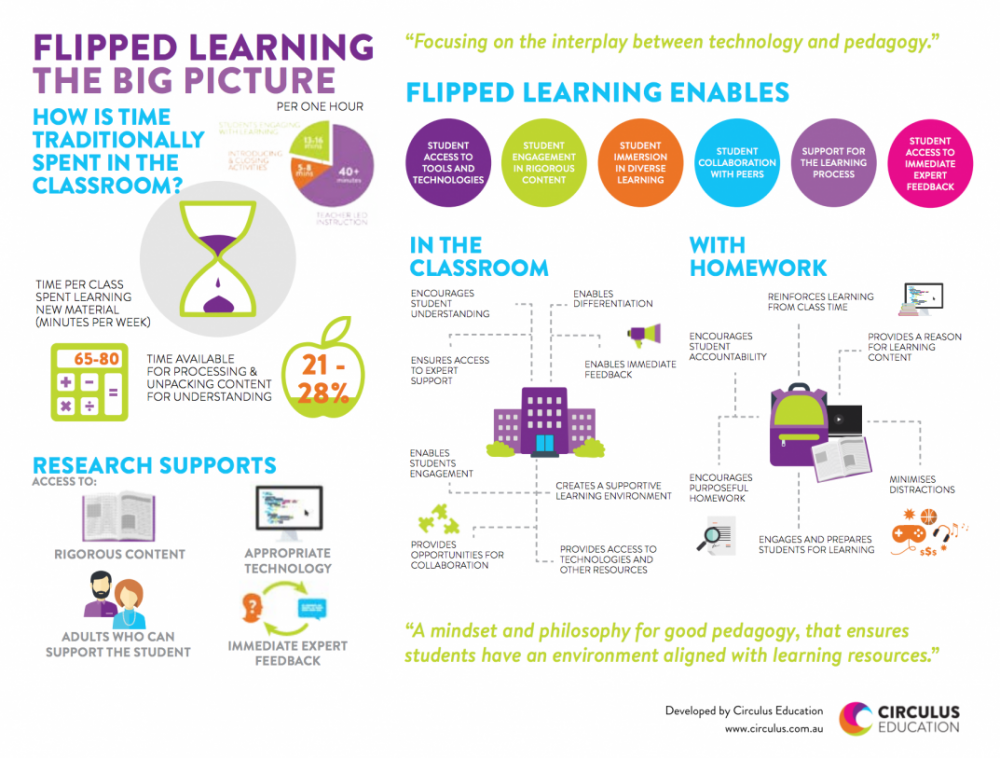
Here is another excellent graphic on flipped learning that we want to bring to your attention. As you see below, “Flipped Learning: The Big Picture” provides a visual illustration of the concept of flipped learning in terms of  what it has to offer to students learning both in class and at home. According to this graphic, flipped learning positively impact the learning that takes place in the classroom in the sense that it:Encourages student understanding, enables differentiation, ensures access to expert support, enables student engagement, creates a supportive learning environment, and provides opportunities for collaboration. Read on to learn more about how flipped learning supports students learning.

New Visual on Flipped Learning

 Follow us on : Twitter, Facebook , Google plus, Pinterest .

10 Useful Math Practice Apps for Elementary Students

April 4, 2015
Looking for some good iPad apps to help  elementary students with their Math? The list below features some of the most popular iPad apps in this category. These apps have been endorsed by a larger base of teachers and educators and are ideal for classroom inclusion. Using these apps, kids will get to practice and develop different mathematical skills through a variety of games, activities, and interactive lessons. Some of these apps also integrate speech functionalities to help students with sight problems.

1- Math Puppy

From toddlers to grade school, for Children of all ages – Math Puppy is the perfect way to build up your math skills. Your child will be able to enjoy a constructive, supportive, interactive fun filled environment while mastering the arts of basic math.

2- My Math Flashcards

My Math Flash Card App is for mastering basic elementary math facts. Its an easy to use and customizable application to enable focused learning. Some of the salient features are: Addition, Subtraction, Multiplication and Division Cards; Randomly generated Flash Cards; Customize to focus mastering a particular fact like Addition by 2 or subtracting by 2; and Simple sound effects to provide feedback.

3- MathBoard

MathBoard is a highly configurable math app appropriate for all school aged children. Beginning in kindergarten, with simple addition and subtraction problems, through elementary school where learning multiplication and division can be a real challenge. MathBoard will allow you to configure the app to best match the abilities of your individual child/student.

4- Motion Math

Feed your fish and play with numbers! Practice mental addition and subtraction with Motion Math: Hungry Fish, a delightful learning game that's fun for children and grownups.

5- Pizza Fractions

In chef's pizzeria your child masters the concept of naming simple fractions using pizza picture examples. Designed for grade levels 2-5, Pizza Fractions provides introductory practice with fractions in an approachable game-like environment.

6- Picture Math

An incredibly fun and effective way to learn math operations (+, -, ×, ÷). Students solve picture puzzles by: (1) watching lessons, (2) answering questions to earn clues, and (3) guessing pictures. Suitable for ages 5-12+.

7- Everyday Mathematics

Players try to match equivalent fractions on cards showing halves, thirds, fourths, fifths, sixths, eighths, tenths, and twelfths. When cards are matched, they disappear and points are awarded. As cards disappear from the array, the cards behind them become accessible. The game ends when all cards are matched or no more matches can be made. Players earn extra points for making two or more matches in a row. To earn all possible points, players must clear the board!

8- Mathmateer

While your rocket is floating weightlessly in space, the real fun begins! Play one of the many fun math missions. Each mission has touchable objects floating in space, including stars, coins, 3D shapes and more! Earn a bronze, silver or gold medal and also try to beat your high score. Missions range in difficulty from even/odd numbers all the way to square roots, so kids and their parents will enjoy hours of fun while learning math.

9- Geoboard

Geoboard is a tool for exploring a variety of mathematical topics introduced in the elementary and middle grades. Learners stretch bands around the pegs to form line segments and polygons and make discoveries about perimeter, area, angles, congruence, fractions, and more.
10- Chicken Coop Fraction Games


Improve your ability to add fractions as you choose the right set of rockets to fire Ernie into the nest. In this hilarious game there are fifty levels to complete and each one will help you get to grips with addition and multiplication of fractions.
Thứ Năm, 2 tháng 4, 2015

5 Great Writing Apps for Elementary Students

April 3, 2015
The selection we curated for you today contains some  useful iPad apps to use with elementary students to help them with their writing. Some the things your kids will get to learn from these apps include: learning how to write letters, learning phonics and spelling, composing syllables by combining vowels and consonants, and several other basic literacy skills. Some of these apps also include tracking features which allow teachers and parents to keep updated about the progress of their kids.

1- Little Writer 


Little Writer is a tracing app that's done just right. Little Writer is super fun and so easy to use that your kids will think letter tracing is a game vs. a boring chore.

2- iWriteWords 

iWriteWords is a very good iPad app that you can use with your kids to teach them handwriting through playing fun and entertaining game.The app has intuitive interface with lot of graphics and colours to keep kids engaged.

3- Kids Writing Pad

Kids Writing Pad is a basic large lined writing pad useful for practicing numbers and letters to make sure you draw them appropriately. It has a middle dotted line between two solid lines like most primary school paper so you can practice having the appropriate parts of the letters or numbers in the right areas. You can choose the color of your pencil or use an eraser, or touch the big eraser to erase the entire page.

4- SpellingCity


VocabularySpellingCity is a fun way to learn spelling and vocabulary words by playing engaging games using any word list. The most popular activities are Spelling TestMe, HangMouse, and our vocabulary and phonics games, available to Premium Members.

5- Dragon Dictation

With Dragon Dictation you can also dictate status updates directly to your Social Networking applications (Facebook and Twitter) or send notes and reminders to yourself….all using your voice.  So when you’re on-the-go, stop typing and start speaking – from short text messages to longer email messages, and anything in between.

Some of The Best Storytelling Apps for Elementary Students

April 2, 2015
The apps below are particularly useful for elementary students but they can also be used with other age groups. Elementary teachers often complain about the paucity of apps that are kids appropriate compared with apps for other age groups. So we thought it would be useful to create a section in this blog devoted entirely to apps specifically curated for elementary teachers. After we have covered math and writing apps, today’s post features some very good iPad storytelling apps to use with young kids. You can use these apps to help kids develop a wide range of basic literacy skills that include: writing, reading and speaking.

1- Story Builder

"With Story Creator you can easily create beautiful story books containing photos, videos, text, and audio all in one gorgeous collection. Story Creator truly brings your best stories to life and easily allows you to retell and share your most memorable moments."

2- Shadow Puppet Edu

"Easily create videos in the classroom! Students as young as five can make videos to tell stories, explain ideas, or document their learning. 30+ lesson ideas supporting Common Core make it easy to get started!"

3- TeleStory

"From the creators of Toontastic (iTunes Hall of Fame, NY Times "Top 10 iPad Apps"), TeleStory takes you behind the scenes to create and broadcast your own TV show! Record a music video, teleport to an alien planet, film a high-speed-chase, or perform on a reality TV show - TeleStory is a TV studio in your pocket."

4- StoryBuilder ofr iPad

"Story Builder is designed to help children accomplish the following educational goals: 1) Improve paragraph formation; 2) Improve integration of ideas; and 3) Improve higher level abstractions by inference. Extensive use of audio clips promotes improved auditory processing for special needs children with autism spectrum disorders or sensory processing disorders."

5- Our Story for iPad

"Reading, even in the digital age, is probably one of the most important skills that children acquire. It can be an important source of pleasure which also develops vital language and social skills. It is fundamental to most school activities, it can also open up new worlds and give access to the wealth of human knowledge."

Thứ Tư, 1 tháng 4, 2015

The Flipped Learning Process Visually Explained

April 2, 2015
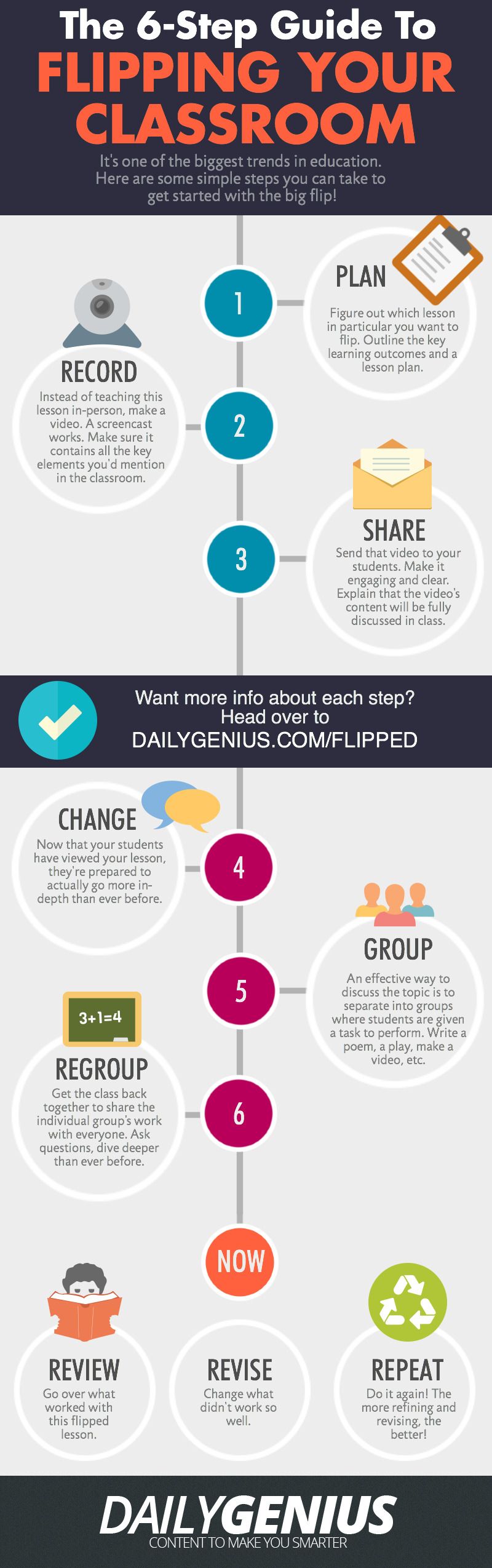
After yesterday’s post on “Flipped Learning Resources” one of our readers emailed us this beautiful visual outlining the six main steps involved in the creation of a flipped classroom. These steps include: planning, recording, sharing, changing, grouping, and regrouping. Read the graphic for more details on each of these steps.

As a refresher for those who are not yet familiar with the concept of a flipped classroom. Flipped learning or Flipped classroom or is a methodology, an approach to learning in which technology is employed to reverse the traditional role of classroom time. If in the past, classroom time is spent at lecturing to students , now in a flipped model, this time is utilized to encourage individualized learning and provide one-on-one help to students, and also to improve student-teacher interaction. While the instructional or teachable content is still available in class, however this content is mainly designed in such a way to be accessed outside class which is a great way for struggling students to learn at their own pace.

6 steps to flipp your classroom
via Daily Genius
Courtesy of eLearning Infographics

Some Useful Blank Social Media Templates to Use in Class

April 1, 2015
One of the recurring requests we keep receiving from our readers is about social media templates to use in class.What we have published so far in this regard are some downloadable Facebook templates which you can access from this link.We also did an extensive search for other sources that provide social media templates usable in educational settings but we were unable to identify any reliable source that we can recommend here other than "Social Media Template Pack" featured onTeachers Pay Teachers.

Social Media Template Pack is a resource that provides some interesting blank educational templates of major social media platforms : Twitter, Facebook,and Instagram. Teachers can use these templates for a variety of tasks including: analyzing book characters, historical figures, or for 'get to know you' activities. Also, the templates can be used with grades 4 to 12 and in different schools subjects (e.g English language arts, social studies, history…etc).

Besides blank social media templates, this pack also includes instructions on how to use each material. The pack is not free. It costs $5.

Follow us on : Twitter, Facebook , Google plus, Pinterest .

Facebook Launched A New Tool for Making Collaborative Videos

April 1, 2015
Facebook launched today Riff, a collaborative video making tool. This app which is available for both Android and iOS allows users to create collaborative videos that can be shared on Facebook as well as on the web. The way it works is pretty simple: you start a video on Riff, when your Facebook friends see it they have the option to add clips to it. Riff puts a limit of maximum video runtime of 20 seconds.

Facebook Riff app

 According to Facebook, “Anyone can start by creating a video. All you have to do is give it a topic, like #AprilFools, then your friends can view it and choose to add their own clips on that topic. Once a friend adds a clip to your video, your friend’s friends will also be shown the video in Riff and will be able to add to it. The potential pool of creative collaborators can grow exponentially from there, so a short video can become an inventive project between circles of friends that you can share to Facebook, or anywhere on the internet, at any time.”

Watch this video to see an example of a Riff video. Curtesy of TNW.