Thứ Năm, 26 tháng 3, 2015

Make The Best of Your Gmail with These Excellent Apps

March 27, 2015
The tools we have curated today are particularly useful for Gmail users. The purpose is to empower you with some interesting apps that would enable you to  tap into the full potential of Gmail. These tools will help you enhance your mailing experience and boost your productivity. Some of the things you can do with these apps include: a quick way to compose a Gmail message embedding the URL of any webpage you want to share with others, easily manage multiple email accounts, create, edit and manage tasks in Gmail, track your emails to know when they have been read, schedule emails to be sent later, access your Gmail offline and many more.

1- Send from Gmail

This extension will open a Compose window in Gmail when you click any email address on a webpage. It also provides a button that will create a Gmail message when clicked, using the page title as the subject and selected page text and link address as the message.

2- Checker Plus for Gmail


Get desktop notifications, read, listen or delete emails without opening Gmail or Inbox by Gmail & easily manage multiple accounts.

3- Todoist for Gmail

The new Gmail plugin keeps you organized, focused, and more productive. Todoist is there wherever you need it—on Google Chrome, your mobile device, desktop, browser, Gmail, and more.

4- MailTrack for Gmail


Straightforward email tracker that tells you when the emails you send have been read. Without any cost or sending limit for Gmail.

5- Right Inbox for Gmail


Right Inbox integrates seamlessly with Gmail and lets you schedule your emails to be delivered at a future time. You may set reminders to the conversations and create recurring emails.

6- Gmail Offline


Gmail Offline beta is a Gmail app built to support offline access, allowing mail to be read, responded to, searched and archived without network access. After first start-up, Gmail Offline will automatically synchronize messages and queued actions anytime Chrome is running and an Internet connection is available.

A Handy App for Converting Google Sheets into Google Docs

March 27, 2015
Save As Doc is an excellent Google Sheets add-on that you can use to convert any spreadsheet created in Google Sheets into a Google Document.The app is especially helpful in improving the legibility of lengthy cell text entered manually or through a Google Form. Some of the features Save As Doc provides to its users include:

The ability to choose any number of adjacent cells to output
Customize column headings by choosing any heading style you want
You can add a page break after each row of data
Generate a Google Doc to keep in your Google Drive

Here is how to use it:
1-Choose "Save As Doc > Start."
2. Select the cells to include or choose "Select all data".
3. Enter a file output name.
4. Modify the output settings in the sidebar.
5. Choose Save as Doc.

A Great Google Tool for Multilingual People

March 26, 2015
Google Input Tools is a very good Chrome extension that allows you to type using any language you want.This is especially helpful for multilingual people who would like to navigate the web using languages not supported by their keyboards.With one simple click, Google Input Tools enables you to switch to typing in a different language and switch back just as easily.


Google Input Tools provides virtual keyboards for over 90 languages and handwriting input for 40 languages. Here is how it works: When you first install the extension, click on the extension icon, then select "Extension Options" in the pop-up menu. A new tab will appear where you can select your preferred languages or input methods. The keyboards, IMEs or handwriting input you add to 'Selected input tools' can be enabled at any time from the extension itself. You can always return to this options page to add, remove, or change the order of your input tools.

Watch the video below to see Google Input Tools in action


Thứ Tư, 25 tháng 3, 2015

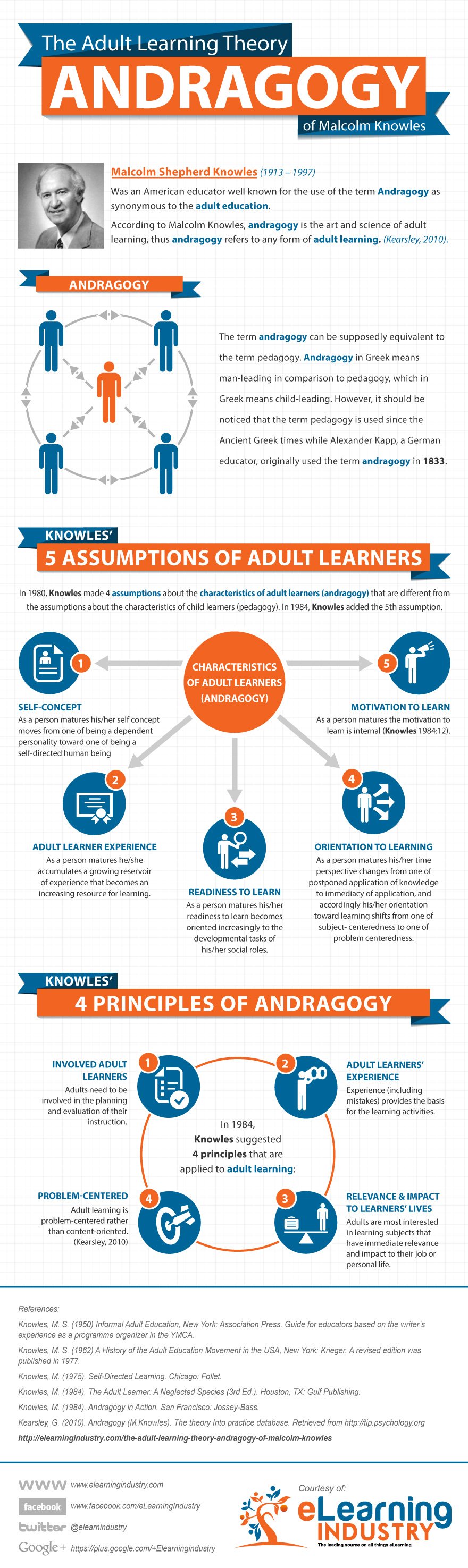
Andragogy Visually Explained for Teachers

March 26, 2015
Andragogy is a teaching strategy developed for adult learners. Andragogy has been around for more than a century but it gained more momentum and came up to the surface in educational literature particularly with the work of Malcom Knowles. Andragogy marks a clear departure from the traditional pedagogy informing child learning in that it is predicated upon 5 assumptions related to the characterstics of adult learners :
1. Self-concept: As a person matures his self concept moves from one of being a dependent personality toward one of being a self-directed human being
2. Experience: As a person matures he accumulates a growing reservoir of experience that becomes an increasing resource for learning.
3. Readiness to learn: As a person matures his readiness to learn becomes oriented increasingly to the developmental tasks of his social roles.
4. Orientation to learning: As a person matures his time perspective changes from one of postponed application of knowledge to immediacy of application, and accordingly his orientation toward learning shifts from one of subject-centeredness to one of problem centredness.
5. Motivation to learn: As a person matures the motivation to learn is internal (Knowles 1984:12)
To learn more about Andragogy, eLearning Industry has this wonderful visual to share with you. Enjoy

Andragogy visually explained Courtesy of eLearning Infographics

A Beautiful Graphic on Emotional Intelligence

March 25, 2015
In the midst of this digital hype instigated by social media and web technologies, much of the  concern and discussion emanating from education community is centrally focused on the digital and technical skills required for thriving in a knowledge economy.Unarguably, digitality is an important part of our students' lives and knowing how to handle it is definitely a pressing requirement, but there are also more important areas that students need to attend to in order to maintain a balanced individual growth. One of them is the emotional part.

In their popular report entitled the Learning Curve, Pearson features emotional intelligence among the the top 8 skills the world is looking for. Similarly, in his classic book Emotional Intelligence:Why It Can Matter More Than IQ, psychologist Daniel Goleman provided a convincing account backed up with a variety of scientific studies highlighting the importance of emotional intelligence in our life . To better understand what emotional intelligence is all about and why it deserves much more attention from us, University of Maryland Online MBA has this excellent graphic to share with you.

productivity tips

Here Is A Good Way to Grade and Annotate Google Drive Files

March 25, 2015
Looking for a good tool to help you annotate files on Google Drive? Challkup is the answer. Chalkup is a great web tool that allows teachers to create classes and share different study materials on a message board that students can access in real-time. Chalkup lets you post discussion prompts, add comments to discussions, distribute announcements and assignments and view files.


Chalkup also provides a very good functionality called MarkUp annotator that allows teachers to easily annotate files and documents they receive from their students. MarkUp is ideal for grading students assignments. It lets you comment, draw and highlight right on the file and students can always submit additional versions of the file. Chalkup has recently integrated rubrics for teachers to use when assessing students assignments and projects.Watch the video below to learn how to use rubrics for grading:


Thứ Ba, 24 tháng 3, 2015

10 Good iPad Apps for Doodling, Drawing and Sketching

March 25, 2015
Do you like doodling? How about some iPad apps to help you create beautiful doodles? The collection below features some interesting applications you can use on your iOS devices to help you carry out a variety of things that include: doodling using different colours, text and fonts, drawing using simple and powerful tools, sketching out your ideas, and sharing your productions in real time.

1- You Doodle: Draw on Photos

"You Doodle is widely considered to be one of the best photo editors on iOS for iPhone, iPad and iPod Touch. You Doodle contains the features of dozens of other photo editors combined, and is the fastest and easiest way to draw on pictures for iOS. Create amazing pics and share to Instagram, Facebook and Twitter and be the envy of all your friends."

2- ASKetch

"ASKetch brings the experience of charcoal drawing to your iPhone, iPad or iTouch and its deliberate simplicity makes it perfect for beginners who want to learn to draw without thinking about palettes and tools."

3- Draw for iPad

"The new iPad version of this app offers the same great cooperative drawing games as the iPhone version. With Draw for iPad, you'll be able to play sketching games over Bluetooth and upload your favorite drawings to Twitter."

4- Jot! Whiteboard

"Jot! is a simple, fast whiteboard that lets you sketch out your ideas and share them in real time. Draw, take notes, or wireframe on your iPad quickly and easily as soon as ideas come to you. Share your ideas via email or save them as photos. Collaborate in real time over the internet with Live Sharing."

 5- Flipink
Flipink is a neat app for you to sketch, share and organize your ideas, thoughts, write down your memos and notes.you can insert images,type texts,and draw graphics as you want, It helps you stay organized and improve productivity, capture ideas flashed through your minds, either at home, at workplace, or on the go.

6- Paper 53

Paper is the simplest way to express your ideas. You don’t need to know how to draw. From sketching out a new product design, to drafting a kitchen remodel or outlining a great business plan, Paper sets your ideas free. It works the way you think, with no fussy settings or distractions. Available with Paper are five beautiful tools to Sketch, Write, Draw, Outline, and Color.

7- Adobe Ideas

Adobe® Ideas gives you the ability to draw freeform vector illustrations wherever you are. Replace your pen and paper with a huge virtual canvas, customizable brushes, and pressure sensitive stylus support. With a Creative Cloud membership, easily sync Adobe Ideas projects to Creative Cloud and open them for refinement in Illustrator.

8- Air Sketch
Air Sketch is great for presentations in the boardroom, classroom, or on the go. Just fire up Air Sketch on the iPad and open the specified URL from any HTML-5 compatible browser on the local network. Your photos and drawings show up natively in the browser. There's no additional client software to install, or services to subscribe to.

9- Brushes
Brushes is a painting app designed exclusively for the iPhone, iPod touch, and iPad. Rewritten from the ground up, Brushes 3 is universal — the same version runs on both your iPhone and your iPad. Move paintings between your devices and keep working wherever you go!

10- Sketchbook Pro
Autodesk SketchBook® Pro for iPad is a professional-grade paint and drawing application. Using the same paint engine as its desktop counterpart, SketchBook Pro delivers a complete set of sketching & painting tools through a streamlined and intuitive user interface designed exclusively for the iPad experience.